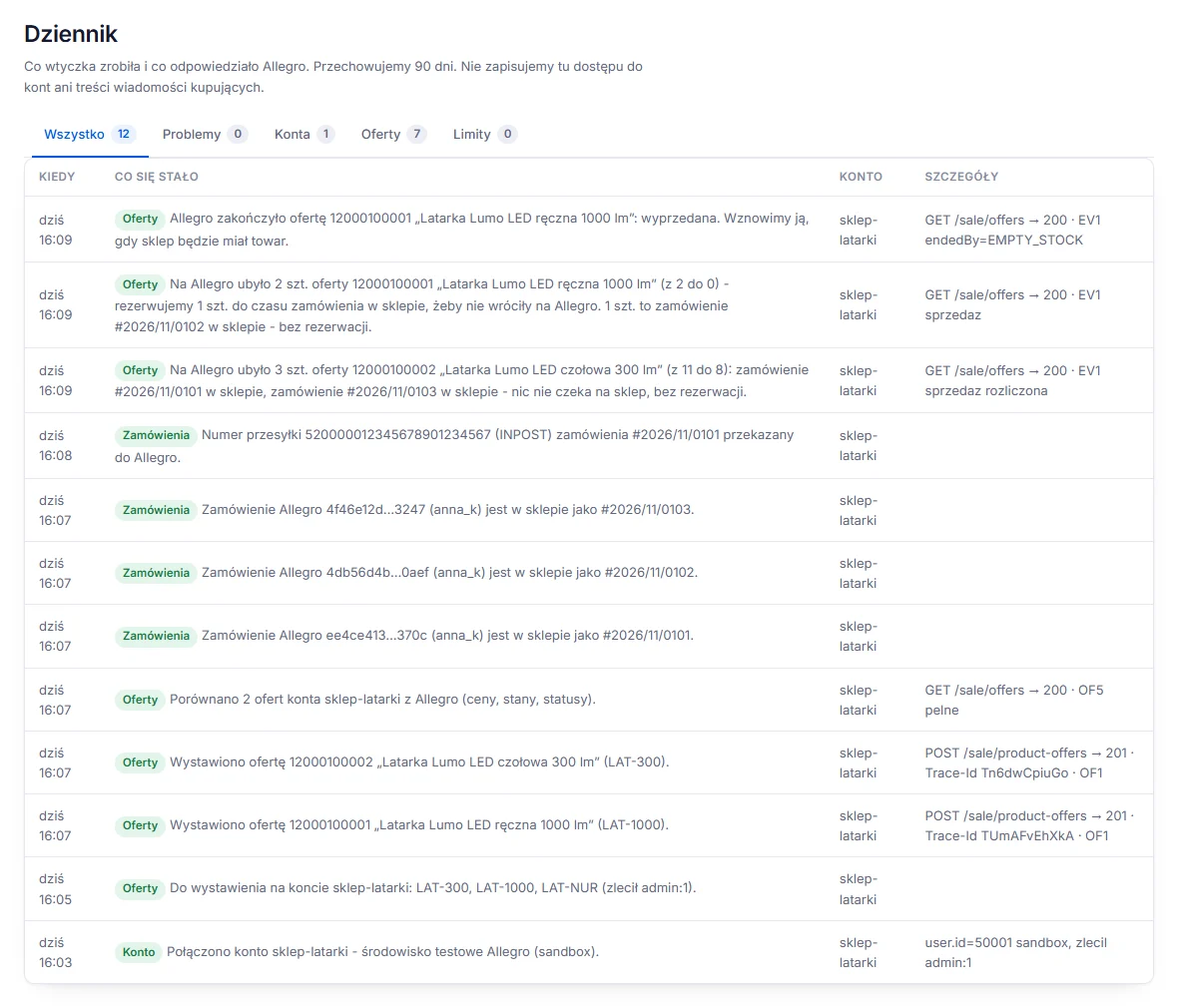
Activity log: every step on record
What the plugin did and what Allegro answered, with the request and its trace id, for 90 days. It does not record account access or the content of buyer messages.
AllegroPlugin for your yourServer online shop
The Allegro plugin connects your shop to your Allegro seller account. It lists products from the Allegro catalogue by EAN, keeps prices and stock in check, and brings paid orders, returns and buyer questions into your shop panel.
79 PLN net / month or 790 PLN net / year
Listings
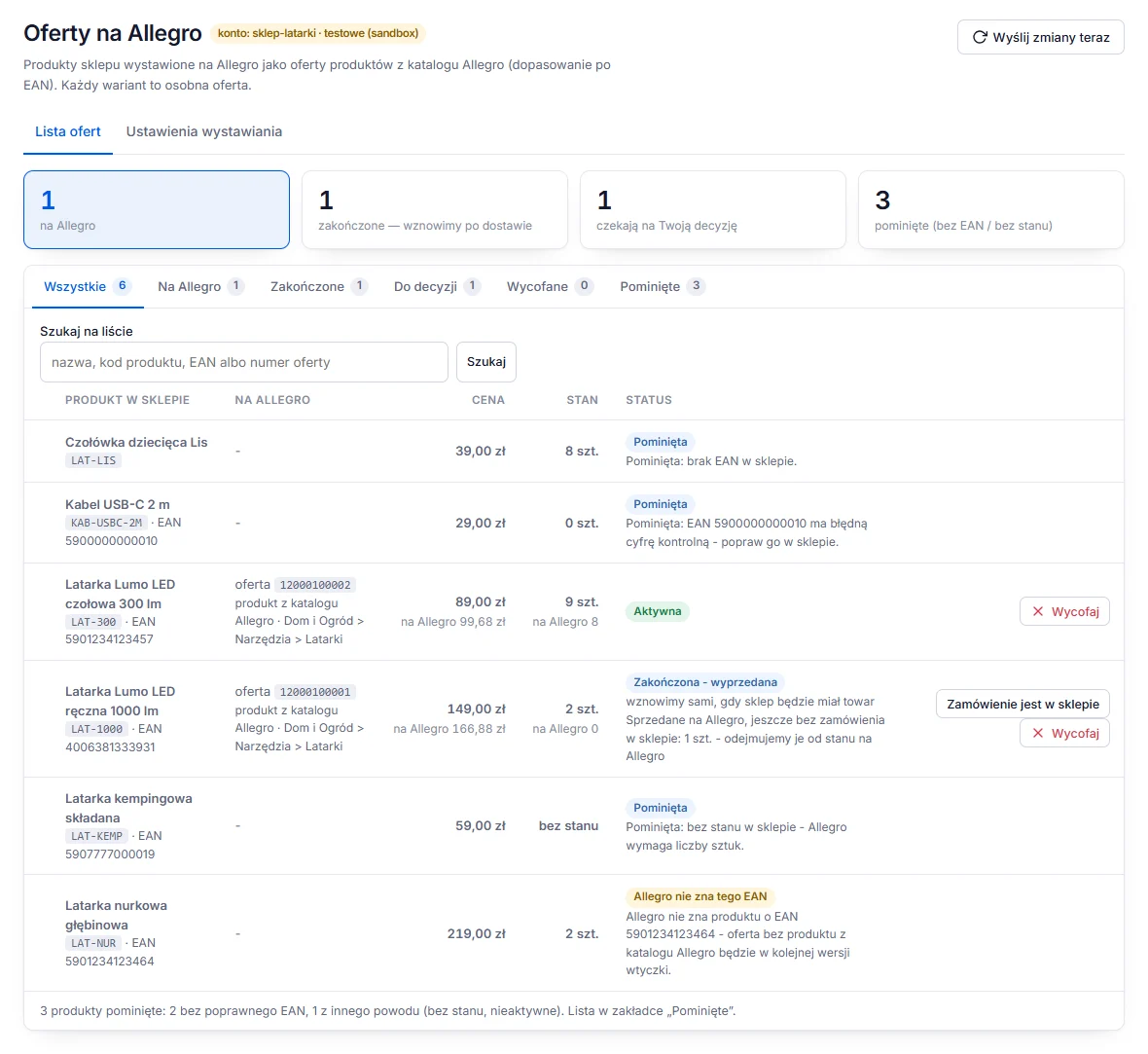
The plugin finds the product in the Allegro catalogue by EAN and lists an offer linked to the catalogue product, with its parameters and, if you like, its description and photos. Every variant in your shop is a separate offer.
Prices and stock
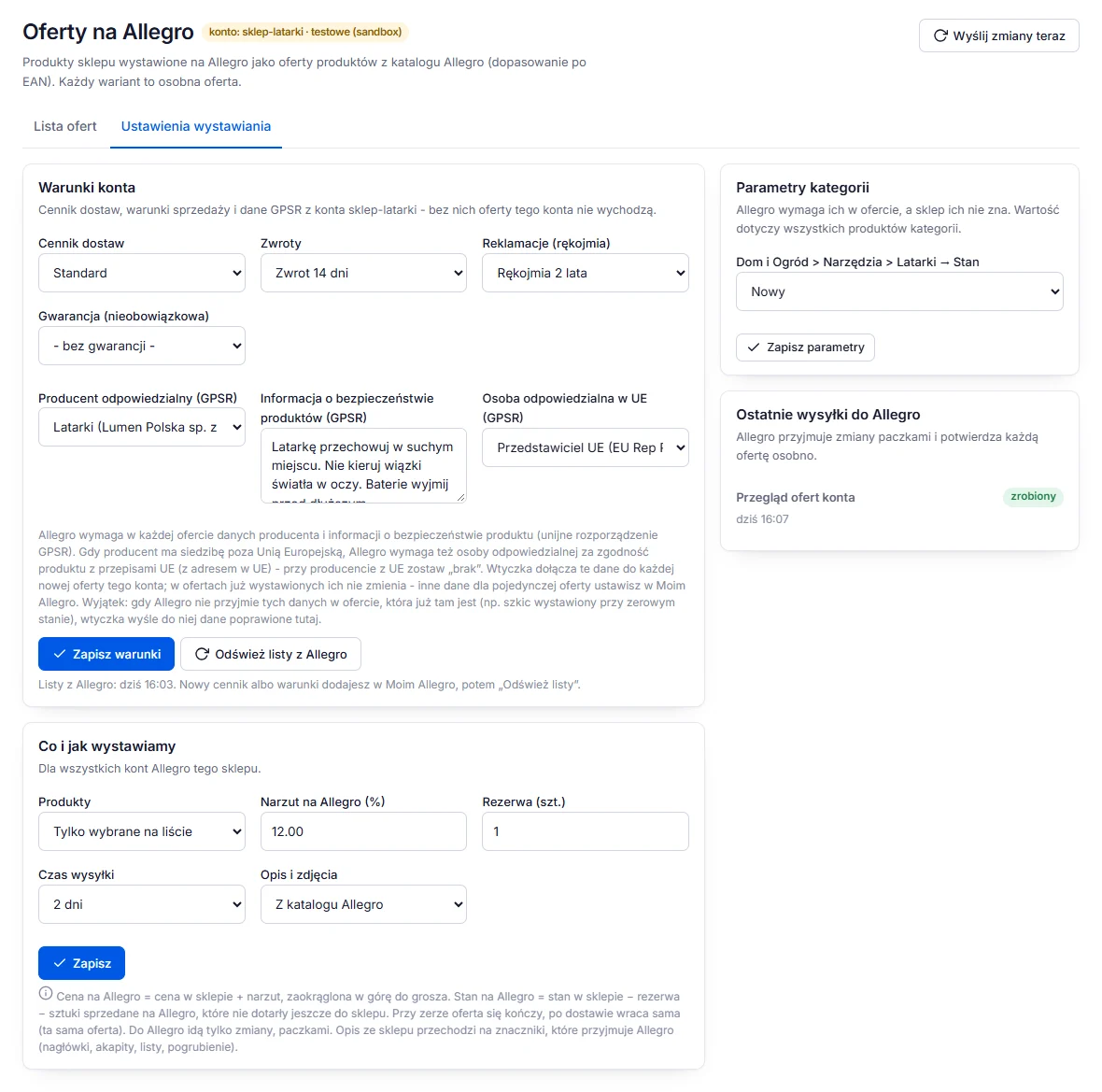
Every 2 minutes the plugin compares prices and stock in your shop with your offers and sends Allegro only what changed, in bulk, up to 1000 offers per command.
Orders and shipments
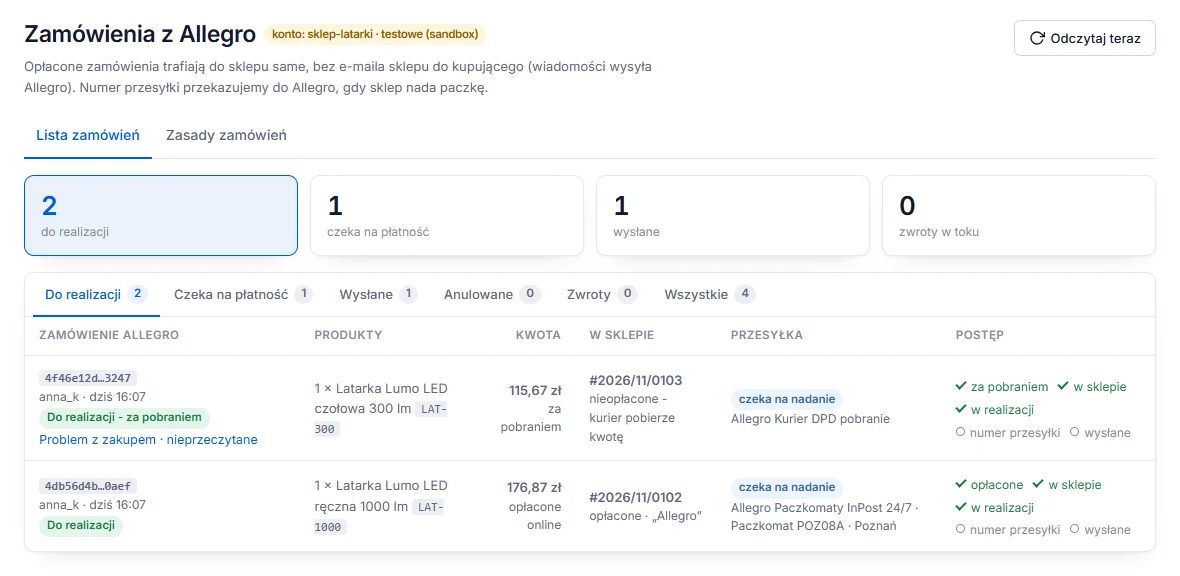
A paid order, or one with cash on delivery, is created in your shop automatically or after your decision. A fixed order reference means a retry never creates a second order. New orders are read every minute.
Messages
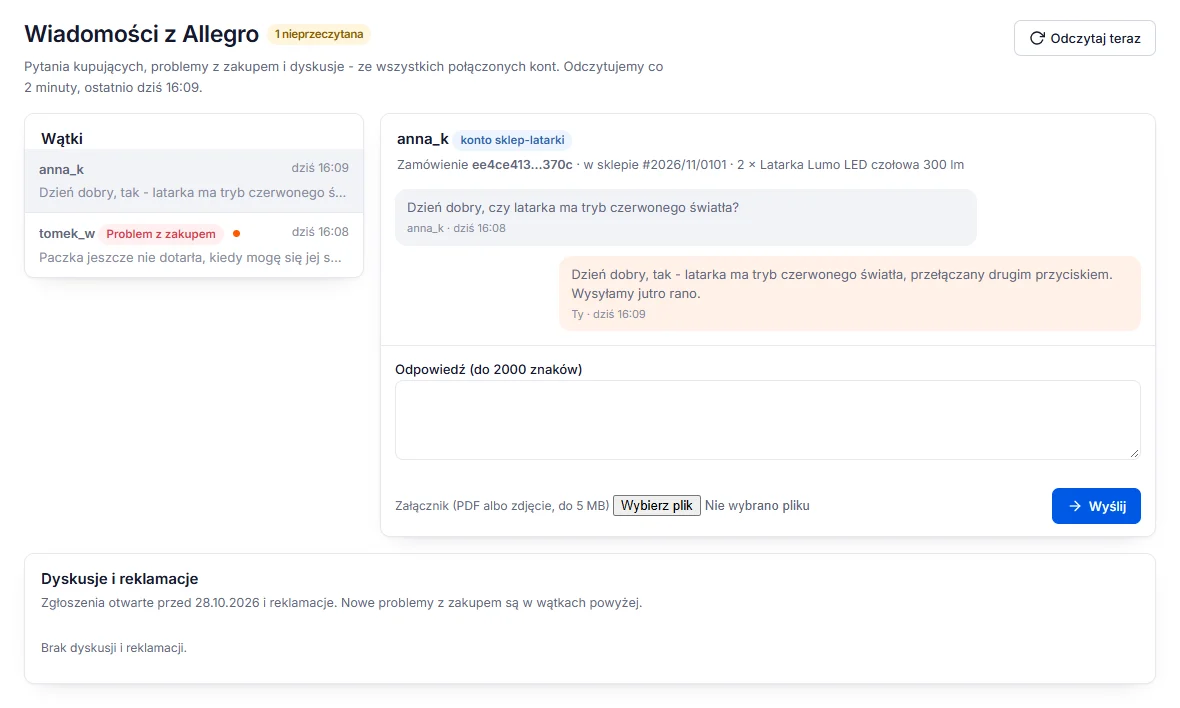
You read and answer the Allegro Message Center, including "Problemy z zakupem" (problems with a purchase), as well as discussions and complaints, in your shop panel.
Everything else
What the plugin did and what Allegro answered, with the request and its trace id, for 90 days. It does not record account access or the content of buyer messages.
Shipping rates, return policies, complaint terms and warranties are read from your Allegro account; you pick them from a list instead of copying them.
The producer and the EU responsible person come from your Allegro account, the safety information is written once per account. If Allegro rejects an offer over GPSR data, you see what to complete.
Connect more than one Allegro account to one shop, each with its own terms. Messages from all accounts land in one list.
Connect each account as a test (sandbox) or production account. Production needs an extra confirmation, so test listings never reach buyers by mistake.
You sign in on Allegro's page (OAuth with PKCE). The plugin never sees your password and keeps access tokens encrypted with AES-256-GCM.
Disabling or uninstalling the plugin ends your active offers within minutes, so nothing sells unattended. Turn it back on and offers with stock return.
How it works
In the yourServer panel open your shop, go to "Wtyczki i moduły" (Plugins and modules) and add Allegro.
Sign in on Allegro's page and allow access. Choose a test or production account; add more accounts the same way.
Choose shipping rates, returns, complaints and GPSR data from your account, then markup, reserve, handling time and description source.
Tick products with an EAN and click "Wystaw zaznaczone" (Publish selected). The status of every offer is on the list.
Prices and stock look after themselves; paid orders, returns and buyer messages arrive in your shop panel.
Pricing
79 PLNnet / month
97.17 PLN gross with VAT
Install from the marketplaceYou pay for 10 months
790 PLNnet / year
971.70 PLN gross with VAT
You save 158 PLN net a year
Install from the marketplacePrices are net; we add 23% VAT. yourServer issues the invoice. Allegro's own fees and commissions are settled with Allegro, as before.
The plugin connects the seller account you sign in to on Allegro and does not check its type. To list offers it needs settings from that account: a shipping rate list, return and complaint terms, and producer data (GPSR) in My Allegro. Without them Allegro will not accept an offer, and the plugin tells you what is missing.
Yes. When connecting an account you choose a test account (Allegro sandbox) or a production one. Sandbox offers are not shown to buyers; switching to production needs a separate confirmation.
Every 2 minutes the plugin compares your shop with your offers and sends only the changes, in bulk commands of up to 1000 offers. Allegro price = shop price + your markup; Allegro stock = shop stock minus the reserve and minus units sold on Allegro that are not in the shop yet. At zero the offer ends and it returns after a delivery.
They are not listed: the plugin marks them as skipped and says why (no EAN, a wrong check digit). If the Allegro catalogue does not know an EAN, the product waits and the plugin asks Allegro again once a day.
GPSR is the EU General Product Safety Regulation: Allegro requires the producer and safety information in every offer, and an EU responsible person for producers outside the EU. You create producers and responsible persons in My Allegro; the plugin reads them from your account, and you type the safety information once per account.
Yes, one shop can have several Allegro accounts, each with its own terms. One Allegro account can be connected to one shop at a time.
The buyer pays on Allegro. The plugin creates the order in your shop once it is paid (or with cash on delivery), automatically or after your decision, and never twice. When you ship it, the tracking number goes back to Allegro.
Disabling or uninstalling the plugin ends all active offers within minutes, so nothing sells while nobody handles the orders. When you turn it back on or reinstall it, offers with stock return. After uninstalling, the plugin's data for your shop is deleted after 30 days.
Order data needed to fulfil orders (such as the delivery address and phone) and the content of buyer messages. Allegro access tokens are encrypted with AES-256-GCM and bound to your shop and account; the plugin never knows your Allegro password. The Activity log does not record account access or message content.
Start with the Activity log: every operation is there with Allegro's answer, and problems have their own tab. If that is not enough, write to us through the contact page and include the time of the event from the log.
Install the plugin from the marketplace in the yourServer panel, or create a shop and add it right away.